
Select all Pages during Facebook OAuth
Always grant access to every Page when connecting Facebook. Meta replaces (not merges) your permissions on every reconnect.
When you connect Facebook to PostFast, Meta asks which Pages PostFast may access. Most users only pick the Page they're posting to that day, which is what causes the other Pages to drop out of PostFast.
Facebook replaces your permissions on every reconnect. It does not merge them with previous grants. If you leave a Page out, PostFast loses access to it immediately. And that applies to every PostFast workspace using the same Facebook login, not just the one you're signed into right now.
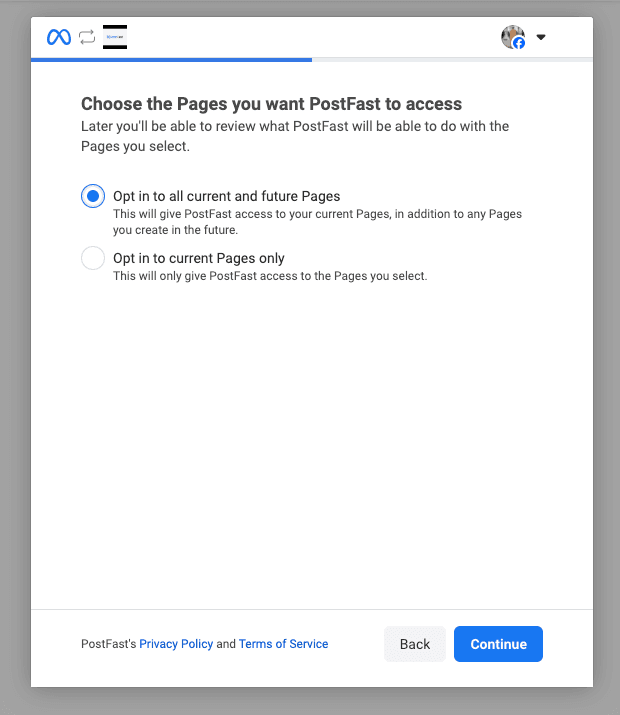
The rule
Grant access to every Page you manage, even Pages you don't plan to post to today. If you ever add a new Page, re-run the connection and include it too.
Step-by-step
- In PostFast, open Accounts from the sidebar.
- Click Add Social Account and pick Facebook. If Facebook is already connected, the same button triggers a reconnect, there is no separate "Reconnect" action.
- Sign in with your Facebook account if prompted.
- On the Meta consent screen, find the Pages section and click Edit access.
- You'll see two radio options. Choose Select all current and future Pages, this grants access to every Page you manage now and any Page you add later.
- If you pick Select only current Pages instead, you must tick every Page in the list that follows. Leaving any Page unticked revokes PostFast's access to that Page. And that revoke is global to your Facebook account: it affects every PostFast workspace connected via the same Facebook login, not only the workspace you're currently signed into.
- Continue through the rest of the permission screens without unchecking anything.
When this matters most: agencies and shared logins.
This problem bites hardest when the same Facebook personal login is used across multiple PostFast workspaces. Example:
- An agency has three workspaces: Brand A, Brand B, Brand C, all managed with one shared Facebook account.
- On Monday, a team member reconnects Facebook inside Brand A and only ticks Brand A's Pages.
- Result: Brand B's and Brand C's Facebook Pages immediately disconnect from their respective workspaces, because Meta only remembers the most recent permission grant for that Facebook account.
Avoid it by always picking Select all current and future Pages on every reconnect. Or, if you must use Select only current Pages, ticking every Page belonging to every workspace you manage with that Facebook login.
Why Meta designed it this way
Meta's OAuth flow is scoped per-session. Each time PostFast asks for access, Meta shows you the full list so you can revoke specific Pages. It's a privacy feature. But it means you must actively re-grant every Page on every reconnect.
If you already disconnected a Page
See Why does my Facebook Page keep disconnecting?: the fix is the same: reconnect and grant access to every Page.
Was this article helpful?
Related articles
Why does my Facebook Page keep disconnecting?
Another user on the same Facebook account reconnected and left your Page out. Reconnect, grant access to every Page, and the issue stops.
Updated 2026-04-13Getting StartedConnect your first social account
Connect a social platform, confirm the connection on the Accounts page, and publish your first post from the composer.
Updated 2026-04-13Getting StartedYour recent posts are imported automatically when you connect an account
Connect or reconnect Facebook Pages, Instagram, Threads, or TikTok and PostFast automatically imports your last 60 days of published posts, with their full stats, including posts you never created in PostFast.
Updated 2026-09-23TelegramConnect a Telegram channel or group to PostFast
Schedule and publish posts to your Telegram channels and groups by adding the PostFast bot as an admin, then connecting from the Accounts page.
Updated 2026-04-14